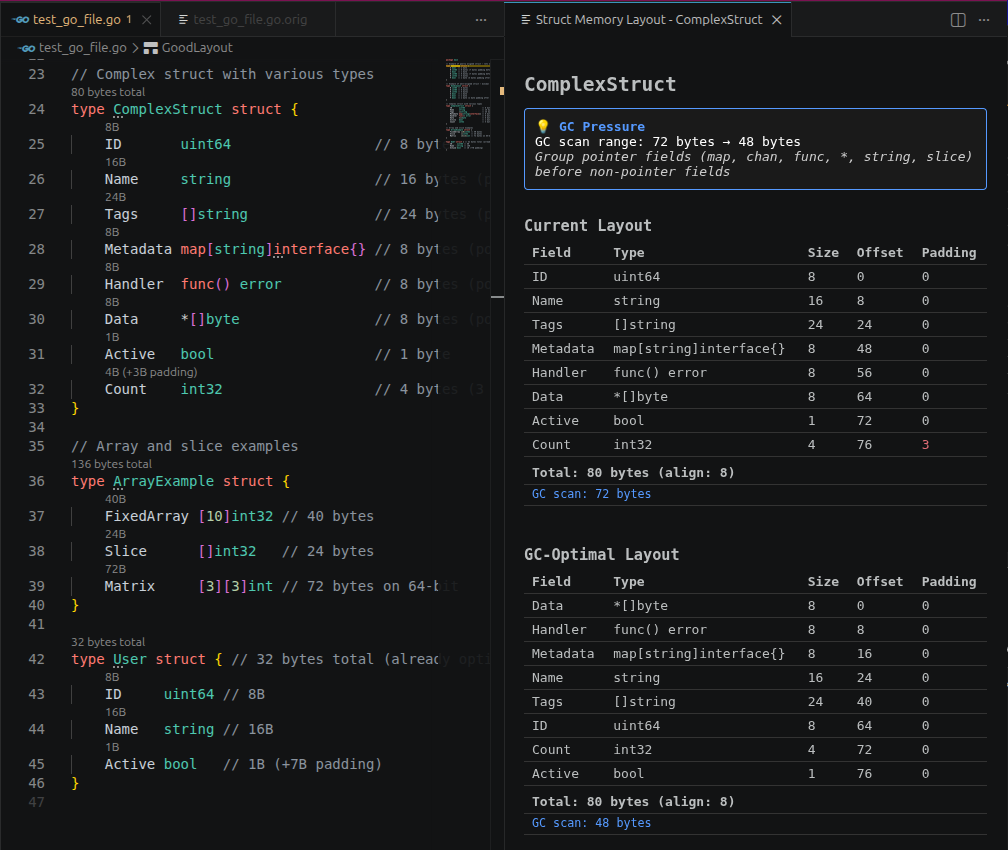
Analyze Struct Layout Panel
The Analyze Struct Layout panel provides a detailed, side-by-side view of struct memory layouts.
Opening
- Click the code lens annotation above any struct name
- Run Go Struct: Analyze Struct Layout from the Command Palette (
Ctrl+Shift+P/Cmd+Shift+P)
Layout
The panel shows up to three columns:
| Column | Description |
|---|---|
| Current | Actual memory layout of the struct as written |
| Size-Optimal | Minimal total size layout (sorted by alignment descending) |
| GC-Optimal | Minimal GC scan range layout (pointer fields grouped first) |
Each column shows:
- Field names with byte offsets
- Padding bytes (grayed)
- Total size footer
- GC scan range footer (e.g. "GC scan: 40 bytes")